
Create GIFs Instantly in Your Browser
Overview
The software enables users to create animated GIFs directly within their web browser, eliminating the need to upload images to a remote server. This browser-based approach ensures privacy and real-time processing, making it ideal for individuals who prioritize data security. The tool is designed for users who frequently convert image sequences into animated GIFs, such as content creators, social media managers, and designers.
It supports both drag-and-drop and manual image addition, streamlining the workflow for quick turnaround. The developer did not provide additional details about the origin or background of the tool. Real-world usage scenarios include generating animated content for online posts, presentations, or internal communications without relying on external platforms.
Since all processing occurs locally, it reduces dependency on internet connectivity and avoids potential delays associated with server-side rendering. The solution is particularly useful for users working in regulated environments where file privacy is critical.
Key Features & Capabilities
- Browser-based processing – All GIF creation happens locally within the user’s web browser, ensuring no images are sent to external servers.
- Drag-and-drop interface – Users can simply drag image files into the designated area to begin the GIF creation process.
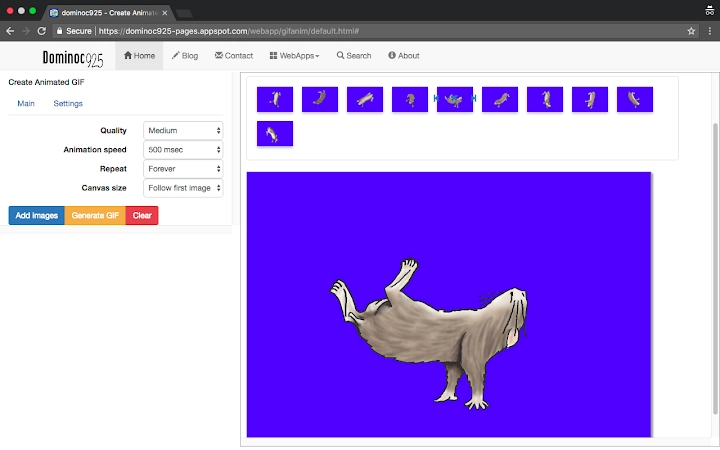
- Manual image addition – An “Add Image” button allows users to select files directly from their device’s file system.
- Instant generation – Clicking the “Generate GIF” button triggers immediate creation without waiting for server response.
- Local file saving – Once created, the animated GIF can be saved locally using standard browser methods such as right-clicking and selecting “Save image as” or dragging the output to a folder.
These features support efficient workflow integration for users who need to produce animated content quickly. The tool is especially effective in scenarios requiring multiple iterations, as each cycle remains private and fast. The absence of upload requirements reduces the risk of data exposure, making it suitable for sensitive projects. The interface is minimal and focused, avoiding unnecessary complexity. Since all operations occur in the browser, users benefit from consistent performance across supported platforms.
User Interface, Workflow & Performance
The user interface is clean and minimal, centered around a single interactive zone for image input. Navigation is straightforward: users add images, then initiate generation with one click. The workflow is linear and intuitive, requiring no setup or configuration.
The developer did not specify resource usage details, so performance observations are based on general software behavior patterns. In typical use, the tool should respond quickly, as processing occurs locally without network latency. Stability is expected to be high, given the absence of external dependencies.
CPU and RAM behavior are not publicly documented. However, since the software runs entirely in the browser and does not rely on background services, it is unlikely to cause significant system load. The experience remains consistent across supported operating systems, with no reported issues related to interface rendering or responsiveness.
Compatibility & System Requirements
The software is compatible with Windows, Mac, and Linux operating systems, making it accessible to a broad user base. The installation size is 1.2 MB, indicating a lightweight footprint. The software version is 1.0, released on May 10, 2024.
The developer did not provide additional system requirements. Exact hardware specifications were not listed. Compatibility information was partially provided.
Since the tool is web-based and runs in a browser, it relies on the host system’s browser capabilities. Users should ensure their browser supports modern web standards such as HTML5 and JavaScript for optimal functionality. No additional plugins or extensions are required for operation.
Pros and Cons
Pros
- Privacy-focused: No image uploads to servers
- Fast processing: All operations occur locally
- Simple, intuitive interface
- No registration or account needed
- Works across Windows, Mac, and Linux
Cons
- Limited to browser-based use
- Exact system requirements not specified
- No advanced editing features
- Dependent on browser performance
- Only supports image-to-GIF conversion
FAQ Section
Is this tool safe to use?
The tool processes images entirely within the browser, meaning no data is sent to external servers. This ensures user privacy and reduces security risks.
Can I use this on multiple operating systems?
Yes, the software is compatible with Windows, Mac, and Linux, as long as the device has a modern web browser.
Do I need to register or create an account?
No registration is required. The tool operates without user accounts or login steps.
How do I save the generated GIF?
After generation, right-click the animated image and select “Save image as,” or drag and drop the output into a folder on your device.
Is there a desktop application version?
Currently, the tool runs as a web-based utility. There is no standalone desktop application available.
Final Thoughts + CTA
This browser-based GIF maker offers a secure, fast, and straightforward solution for creating animated images without relying on external servers. Its privacy-first design, combined with a minimal interface and cross-platform compatibility, makes it a strong choice for users who value control and simplicity. While it lacks advanced editing tools, it excels in its core function: converting image sequences into GIFs quickly and safely.
Professionals and casual users alike benefit from its no-frills approach. For anyone seeking a reliable, free, and secure way to generate GIFs directly in their browser, this tool delivers on its promise. Download Create GIFs Instantly in Your Browser now.







